SmileyfaceGUIDE
Acid bass line thing for the FM-1. You don't have to read any of this: press GLO on the FM-1 any time and it explains itself.
Quick start
- Hit
LFOuntil you find something you like. - Twist
ALGORITHMto view all the knobs and switches.
Press PLAY if it isn't playing. Tap HOME and see what happens. Hold it to open your projects.
Write a pattern
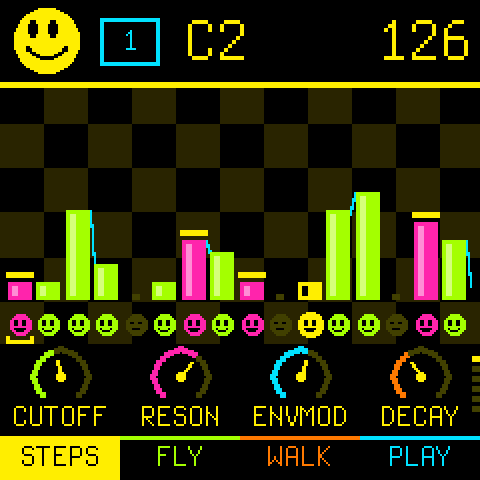
The bars are your 16 steps, and taller means higher. The little smileys underneath are asleep on a rest, and wide awake on a note.
- Press a key to write a note on the cursor's step. The cursor moves on by itself.
- Press
ENVto give the step an accent. HoldENVwhile you press a key to write it with one. - Tap
SELto slide the step into the next one. Same trick: holdSELwhile you press a key. - Press
EDITfor a rest. - Hold
SELand turnSELECTto wrap the pattern round. The steps slide along, forwards or backwards, and the ones that fall off one end come back at the other. - Turn
SELECTto move the cursor around without writing. - Press
OCT-orOCT+to play lower or higher.
Twist the knobs
The four dials at the bottom are KNOB 1 to KNOB 4. They always change the sound, in every view, so you can twist while you play. Turn ALGORITHM to reach the next page of knobs (the dots at the right show where you are).
| 1 | CUTOFF opens the filter | RESON makes it sing | ENVMOD how far each note sweeps it | DECAY how long the sweep takes |
|---|---|---|---|---|
| 2 | TUNE nudges the pitch | ACCENT how hard accents hit | SLIDE how long slides take | TEMPO the speed |
| 3 | DRIVE oscillator into the filter | ACC DEC how long an accent rings | TRACK filter follows pitch | ATTACK a soft start |
| 4 | FILT FM oscillator shakes the filter | SWING swings the odd steps | LENGTH how many steps play | LEVEL how loud it is |
| 5 | WAVE saw or square | SUB OSC a square an octave down | MUFFLE 0, 1, 2 | SWEEP slow, norm, fast |
| 6 | HI RES resonance past the edge | POLES three poles or four | ACCENT accents on or off |
The pages follow the TD-3-MO's panel: the filter, then tune and accent, then the Devil Fish row (drive, accent decay, tracking, soft attack), then the extras. The last two pages (5 and 6) are the switches, drawn as switches (wave, sub osc, muffler, sweep speed, hi-res, poles, accent on or off): turn a knob right to flip one up. Page 4 has the tempo's neighbours: swing, pattern length and the output level.
Patterns, cue and chain
Every project has 16 patterns. Turn PRESETS to pick the one you're writing. While it's playing, the new one waits for the end of the loop.
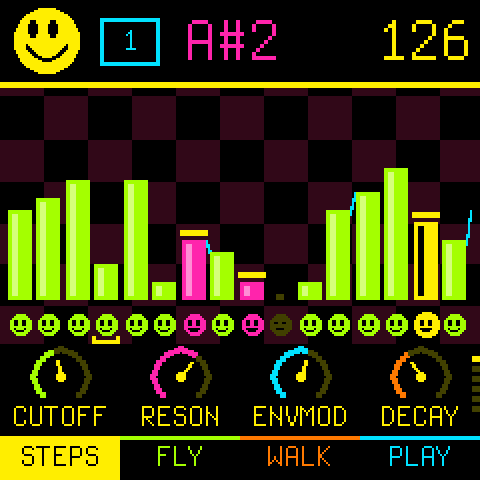
In the PLAY view the 16 white keys are the 16 patterns, left to right.
- Press a key to cue that pattern. It starts when the current one ends.
- Press several keys to chain patterns. They play in the order you pressed them, and the pink numbers show the order.
- Press
EDITto clear the chain. - Hold
ENVto accent everything that's playing. It's the Devil Fish's accent button.
Each pattern has its own length. Turn ALGORITHM to page 4 and use KNOB 3.
Projects
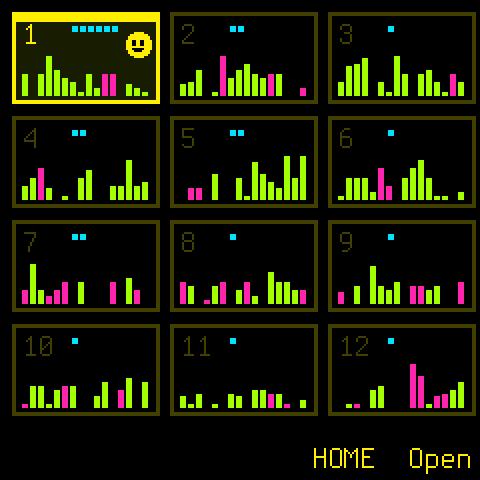
Hold HOME to see your 12 projects. A project is 16 patterns, the sound and the tempo.
- Turn
SELECTto pick one and pressHOMEto open it. - Hold
SELon a project to copy it into a free spot. HoldEDITto start it over. - Send a project to a friend, or load theirs, on the Share page.
- Press
SAVEto save. Stop touching it for two seconds and it saves by itself.
More tricks
LFOis a random pattern.ARPnudges a few steps.FXis undo, and pressing it again flips back.- Tap
SEQin time to set the tempo. Or turnALGORITHMonce and useKNOB 4. - Send MIDI clock to the FM-1 and it follows it. The tempo turns blue. Start and stop come along too.
- Play it from a keyboard over USB-MIDI. Hard notes (velocity 100 and up) are accents.
- Press
GLOandHOMEtogether for the menu: Factory Reset, and Roll The Dice, which fills every pattern of every project with random stuff (you have to holdOCT+to confirm). - Everything on one page, ready to print: the cheat sheet.